









SKU/Artículo: AMZ-B0CMZZ51T4
BITFUNX
BlueRetro PS2/PS1/PS One Wireless Controller Adapter - Support Firmware Upgrade, Dual-Mode BT, Keymap Configuration, Compatible with PS3/PS4/PS5,Series X/S,Switch Pro Bluetooth Controllers (Black, MINI)
Size:
MINI
Color:
Black
Detalles del producto
Disponibilidad:
En stock
En stock
Peso con empaque:
0.15 kg
0.15 kg
Devolución:
Sí
Sí
Condición
Nuevo
Nuevo
Producto de:
Amazon
Amazon
Viaja desde
USA
USA
Sobre este producto
- BlueRetro PS2/PS1/PS One Wireless Controller Adapter - Support Firmware Upgrade, Dual-Mode BT, Keymap Configuration, Compatible with PS3/PS4/PS5,Series X/S,Switch Pro Bluetooth Controllers
AR$80.511
49% OFF
AR$41.288
IMPORT EASILY
By purchasing this product you can deduct VAT with your RUT number
AR$80.511
49% OFF
AR$41.288
 Llega en 8 a 12 días hábiles
con envío
 Tienes garantía de entrega
Este producto viaja
de USA ![]() a tus manos en
a tus manos en
![]()
 a tus manos en

Conoce más detalles
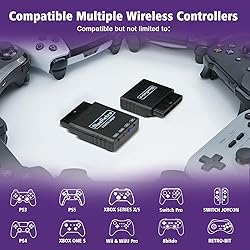
【Widely Compatible】Suitable for PS2/PS1/PS One game console, compatible with PS3/PS4/PS5, Xbox One S, Xbox Series X/S, Wii/Wii U Pro, Switch Pro, Switch Joycon, 8bit-do, Retro-Bit wireless controller, etc.(NOTE: only official PS3/ PS4 controllers are supported) 【Stable Connection】Zero latency, support both BT Classic and BT Low Energy (BLE). The key value of the buttons can be configured through the web bluetooth port of the Google Chrome. 【Crucial Tip】Keep your adapter updated by holding the PAIR button while connecting it to a PC via USB. If unrecognized, install the CH340 driver. Features a backup micro-USB port for external power if the console's controller port provides insufficient voltage. 【Note1】This adapter can only be connected to one wireless controller at a time. Can NOT support the games Call of Duty 2 and Duty 3 for now and does NOT compatible with 2.4g wireless controllers(Bluetooth only). 【Note2】The 8bit-do m30 controller is in joystick mode by default. Please press and hold the "Up" + "Select" keys on the controller for about 5 seconds to switch it to D-pad mode to solve the button non-working problem.
Compra protegida
Disfruta de una experiencia de compra segura y confiable
Tarjetas de Crédito y Débito

Visa

Mastercard

American Express
Pagos a través de PayPal
Compra procesada en dólares con dinero en cuenta o tarjetas internacionales.

Paypal
Pagos a través de MODO
Compra procesada en pesos desde la App de tu banco.

PayPal

