











SKU/Artículo: AMZ-B0CVZZNZQM
AXYBCOOL
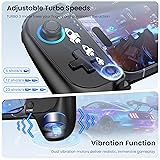
AXYBCOOL Wireless Mobile Controller for iPhone & Android - Hall Effect Joystick, No Drift - Compatible with Xbox Game Pass, Steam Link, Call of Duty, Roblox
Color:
Black
Size:
MC100 series
Detalles del producto
Disponibilidad:
En stock
En stock
Peso con empaque:
0.45 kg
0.45 kg
Devolución:
Sí
Sí
Condición
Nuevo
Nuevo
Producto de:
Amazon
Amazon
Viaja desde
USA
USA
Sobre este producto
- Play Any Game that Supports Controllers : The wireless mobile controller can play hundreds of controller-enabled games such as Call of Duty, Roblox, Fortnite, Genshin Impact, and more, and supports virtually all cloud-based gaming services including Xbox Game Pass, , Steam Link, GeForce NOW, MFi Apple Arcade
AR$175.935
60% OFF
AR$70.377
IMPORT EASILY
By purchasing this product you can deduct VAT with your RUT number
AR$175.935
60% OFF
AR$70.377
 Llega en 8 a 12 días hábiles
con envío
 Tienes garantía de entrega
Este producto viaja
de USA ![]() a tus manos en
a tus manos en
![]()
 a tus manos en

Conoce más detalles
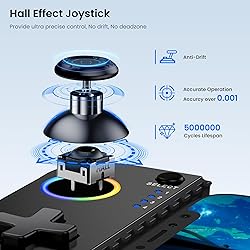
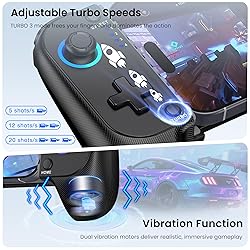
Play Any Game That Supports Controllers:The wireless mobile controller can play hundreds of controller-enabled games such as Call of Duty Mobile, Roblox, Fortnite, Genshin Impact, and more, and supports popular cloud gaming services including Xbox Game Pass, Steam Link, and GeForce NOW. ( 💔Not supports PlayStation Remote Play) Stabilized Hall Effect Joystick with RGB Customization:Equipped with drift-free Hall Effect joysticks for pinpoint accuracy and unlimited lifespan. Customize your vibe with dynamic RGB lighting: press TURBO+L3 to toggle ABXY backlighting, and TURBO+R3 to cycle through joystick aperture effects. Universal Fit for Phones 10cm-17.5cm with Case Support:Features a fully adjustable clamp (10cm-17.5cm) with soft rubber padding to securely hold your device—even with most regular phone cases. The ergonomic grip ensures comfort during marathon gaming sessions. Turbo Speeds & Dual Vibration for Competitive Edge:Choose from 3 turbo speeds (5/12/20 presses per second) for rapid-fire attacks. Dual vibration motors deliver immersive, game-synced feedback to pull you deeper into the action. Complete Ready-to-Play Kit with Long-Lasting Battery:Includes USB-C cable, and quick-start guide. The high-capacity battery offers extended playtime, while Bluetooth 5.0 ensures a stable, low-latency connection every time. Connection Guide : B+HOME button to connect,the 4th LED flashs(if flashing 1.2.3, it is incorrect), turn on your phone's Bluetooth,then find corresponding Bluetooth name and connect:Android: Wireless Controller, iOS : DUALSHOCK 4 Wireless Controller. After connecting once, you can connect back by pressing the ‘HOME’ button when the phone's Bluetooth is on
Compra protegida
Disfruta de una experiencia de compra segura y confiable
Tarjetas de Crédito y Débito

Visa

Mastercard

American Express
Pagos a través de PayPal
Compra procesada en dólares con dinero en cuenta o tarjetas internacionales.

Paypal
Pagos a través de MODO
Compra procesada en pesos desde la App de tu banco.

PayPal

