







SKU/Artículo: AMZ-B0DFWMG568
ZWP
ZWP V2 Pro Replacement Voice Remote Control fit for vSeeBox V1 Pro / V2 Pro/Elite/ V1 Max, for OctaStream Elite Max Android TV Box Elite-3
Detalles del producto
Disponibilidad:
En stock
En stock
Peso con empaque:
0.15 kg
0.15 kg
Devolución:
Sí
Sí
Condición
Nuevo
Nuevo
Producto de:
Amazon
Amazon
Viaja desde
USA
USA
AR$55.084
31% OFF
AR$37.984
IMPORT EASILY
By purchasing this product you can deduct VAT with your RUT number
AR$55.084
31% OFF
AR$37.984
 Llega en 8 a 12 días hábiles
con envío
 Tienes garantía de entrega
Este producto viaja
de USA ![]() a tus manos en
a tus manos en
![]()
 a tus manos en

Conoce más detalles
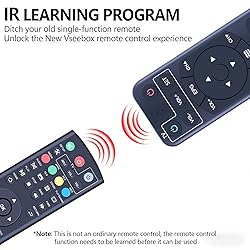
Compatibility: Easily connects with multiple Box models including V1, V2, Elite, and Max, providing a versatile control solution for your Box range. Elite Max elite-3 Easy To Pair Pairing is required before using the voice function Hold [OK] and [VOL-] buttons until the red light flashes on the remote indicator andTV shows "Remote control connected successfully" How To Learning Procedure: 1. Press "SET" key for 3 seconds, the red light on. 2. Press " Power" key in TV CONTROL area in 10 seconds, the red light flash. 3. Keep TV remote IR and STB remote IR face to face in 3cm, press "power" key on TV remote, the red light flash 3 times and keep lighting, learning successful. 4. Repeat step 2 and 3 to learn other keys. Press " SET" key again to exit learning status. Note: If remote cannot recognize any commandand shows "No recognition result matched"we recommend disconnecting and repairing the remote to see if it works after pairing. 【Premium Performance】The remote control has a premium performance and can standby for about 6 months, with ultra-low power consumption for more energy saving. Precise control distance up to 40FT, the total number of button clicks can be more than 160,000 times, high quality only for you to provide quality enjoyment, so that you no longer need to find a durable remote control trouble 【Package Including & After-Sales Service】1* Replacement Remote Control (not include the battery) We will provide up to 1 years after-sales service for remote control. Product quality and your good experience is always our basic principle, you have any dissatisfaction in the use of the remote control can be at any time to contact us, for you to solve the problem is our honor
Compra protegida
Disfruta de una experiencia de compra segura y confiable
Tarjetas de Crédito y Débito

Visa

Mastercard

American Express
Pagos a través de PayPal
Compra procesada en dólares con dinero en cuenta o tarjetas internacionales.

Paypal
Pagos a través de MODO
Compra procesada en pesos desde la App de tu banco.

PayPal

