









SKU/Artículo: AMZ-B0DJ2VC6T9
ZEZEFUFU
Replacement G20S PRO BT 2.4G Wireless Voice Air Mouse for Android TV Box Smart TV Remote
Detalles del producto
Disponibilidad:
En stock
En stock
Peso con empaque:
0.15 kg
0.15 kg
Devolución:
Sí
Sí
Condición
Nuevo
Nuevo
Producto de:
Amazon
Amazon
Viaja desde
USA
USA
Sobre este producto
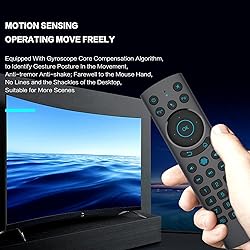
- Features: Single-sided design for ultimate simplicity More distinguishable, permanent, wear resisting Best button particles and function arrangement design Equipped with gyroscope core compensation algorithm, to identify gesture in the movement, anti-tremor anti-shake; farewell to the mouse hand, no lines and the shackles of the desktop, suitable for more scenes To use the Bluetooth mode, you need to disconnect the USB receiver, press and hold the OK button and the Back button at the same time, and enter the pairing mode for 3-5 seconds. The Bluetooth mode currently only supports the use of the for Android system. Support for Google Voice Assistant. But in Bluetooth mode, the voice function can only support ATV system equipment. 2.4G Bluetooth dual mode, ATV voice compatible Power, mute two keys to support infrared learning Specifications: Material: Silicon keys+Plastic Shell Color: Black Max Operating Distance: 8-10m Battery: 2x AAA Batteries (not included) battery Voltage: 3V Size: 160x42x18mm Applicable Model for IPTV Web TV, Smart TV, for TV, for Android TV Box/Stick, Home Appliances, Multi-media Devices,etc. Package include: 1x G20S PRO BT Remote Control (without battery)
AR$86.707
60% OFF
AR$34.679
IMPORT EASILY
By purchasing this product you can deduct VAT with your RUT number
AR$86.707
60% OFF
AR$34.679
 Llega en 12 a 18 días hábiles
con envío
 Tienes garantía de entrega
Este producto viaja
de USA ![]() a tus manos en
a tus manos en
![]()
 a tus manos en

Conoce más detalles
Single-sided design for ultimate simplicity More distinguishable, permanent, wear resisting Best button particles and function arrangement design Equipped with gyroscope core compensation algorithm, to identify gesture in the movement, anti-tremor anti-shake; farewell to the mouse hand, no lines and the shackles of the desktop, suitable for more scenes To use the Bluetooth mode, you need to disconnect the USB receiver, press and hold the OK button and the Back button at the same time, and enter the pairing mode for 3-5 seconds. The Bluetooth mode currently only supports the use of the for Android system.
Compra protegida
Disfruta de una experiencia de compra segura y confiable
Tarjetas de Crédito y Débito

Visa

Mastercard

American Express
Pagos a través de PayPal
Compra procesada en dólares con dinero en cuenta o tarjetas internacionales.

Paypal
Pagos a través de MODO
Compra procesada en pesos desde la App de tu banco.

PayPal

