








SKU/Artículo: AMZ-B0G47MMB7N
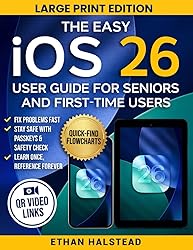
The Easy iOS 26 User Guide for Seniors and First-Time Users: Step-by-Step Help, Quick-Find Flowcharts, QR Video Links to Fix Problems Fast, Stay Safe, and Master Your iPhone & iPad with Confidence
Format:
Paperback
Detalles del producto
Disponibilidad:
En stock
En stock
Peso con empaque:
0.49 kg
0.49 kg
Devolución:
Sí
Sí
Condición
Nuevo
Nuevo
Producto de:
Amazon
Amazon
Viaja desde
USA
USA
Sobre este producto
- Stop Struggling with Your iPhone — Get Answers in 2 Minutes or Less (Even If You’re “Not Techie”)Do menus, pop-ups, and new settings make you nervous you’ll break something?Are you missing calls, photos, or messages because you can’t find the right switch—when you need it most?Worried about privacy, scams, or unwanted sharing and wish someone would show you the exact steps—in large print—without the jargon? Let’s be honest: most “guides” drown beginners in features and ignore the anxiety that seniors and first-time users actually feel. Confidence—not clutter—is the missing piece. Many older adults report low confidence with smartphones and need clear, visual, repeatable steps—not vague tips. This book fixes that with a Quick-Find emergency system, color-coded flowcharts, and large-print, plain-English walkthroughs—plus clickable video links—so you can go from panic to solved in minutes and lock down your privacy the right way. You will learn:The 2-Minute Fix Formula: open the right screen the first time—no guessing, no dead ends.Privacy without the Panic: when to tap Allow vs Don’t Allow, and how Apple’s tracking prompts actually work—so you control your data, not the other way around.Safety on Demand: how to stop sharing instantly if something feels wrong, then safely re-enable only what you choose.Everyday Wins in 5 Minutes: the exact habits that prevent missed calls, “storage full,” and photo chaos—and how to make text larger so everything is readable.Shortcuts that Actually Save Time: simple automations that run at a time, at a place, or when an app opens—so routine tasks happen while you live your life.Flowcharts + Video Links: see it, do it, done—no tech speak, no guessing, and no more waiting for a relative to fix it for you. Even if you’ve tried other manuals and gave up… even if you’re convinced you’ll “tap the wrong thing”… even if you’ve avoided updates for months—this guide meets you where you are. Start with one Quick-Find flow, follow the big-print steps, and practice for a few minutes a day; your confidence compounds quickly because every page is designed to show you—then let you do it. And if you ever feel stuck, click the built-in video link for the exact task and watch it once before trying again. (Yes, it’s that straightforward.)Ready to feel calm, capable, and in control of your device? Add to Cart now—then Buy Now to get the large-print, step-by-step guide with Quick-Find flowcharts and video help at your fingertips. Scroll to the top of the page and Order Now.
AR$50.525
44% OFF
AR$28.071
IMPORT EASILY
By purchasing this product you can deduct VAT with your RUT number
AR$50.525
44% OFF
AR$28.071
 Llega en 8 a 12 días hábiles
con envío
 Tienes garantía de entrega
Este producto viaja
de USA ![]() a tus manos en
a tus manos en
![]()
 a tus manos en

Compra protegida
Disfruta de una experiencia de compra segura y confiable
Tarjetas de Crédito y Débito

Visa

Mastercard

American Express
Pagos a través de PayPal
Compra procesada en dólares con dinero en cuenta o tarjetas internacionales.

Paypal
Pagos a través de MODO
Compra procesada en pesos desde la App de tu banco.

PayPal

