









SKU/Artículo: AMZ-B08HK2YJ4P
Lelukee
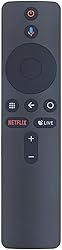
Remote Control for Xiaomi Mi Box S Replacement Remote Control for Xiaomi Mi Box S with Bluetooth&Voice Remote
Detalles del producto
Disponibilidad:
En stock
En stock
Peso con empaque:
0.15 kg
0.15 kg
Devolución:
Sí
Sí
Condición
Nuevo
Nuevo
Producto de:
Amazon
Amazon
Viaja desde
USA
USA
Sobre este producto
- Item Type: Remote Control Material: ABS Shell Color: BlackPower by : 2xAAA Batteries(Not Included)Weight: Approx. 42g Package List:1x Remote Control How to pair Xiaomi Mi Box S and remote controller?Step 1: Open the battery cover of the Bluetooth remote control, remove the insulation film, and install the battery (positive side up) and the battery cover. Step 2: Enter [Settings] -> [System Settings] -> [Network] -> [Bluetooth]. Step 3: Press the Bluetooth remote control [ button. Step 4: Use the remote control to click [Search Device] -> [Searched Device] -> Click [Xiameter Bluetooth Remote Control]. Step 5: After performing the above steps, you can see the Xiaomi Bluetooth remote control in the paired device list, and when the "drip" sound is emitted, operate the Bluetooth remote control direction.
AR$41.503
55% OFF
AR$18.868
IMPORT EASILY
By purchasing this product you can deduct VAT with your RUT number
AR$41.503
55% OFF
AR$18.868
 Llega en 8 a 12 días hábiles
con envío
 Tienes garantía de entrega
Este producto viaja
de USA ![]() a tus manos en
a tus manos en
![]()
 a tus manos en

Conoce más detalles
Remote Control Compatible with Xiaomi Mi Box S TV Support Bluetooth and voice control Replacement of original remote Compatible with Xiaomi Mi Box S TV Power by 2xAAA Batteries(Not Included) Plug in the battery remote control to use
Compra protegida
Disfruta de una experiencia de compra segura y confiable
Tarjetas de Crédito y Débito

Visa

Mastercard

American Express
Pagos a través de PayPal
Compra procesada en dólares con dinero en cuenta o tarjetas internacionales.

Paypal
Pagos a través de MODO
Compra procesada en pesos desde la App de tu banco.

PayPal

