









SKU/Artículo: AMZ-B0FVLQZ5RD
Koepluoo
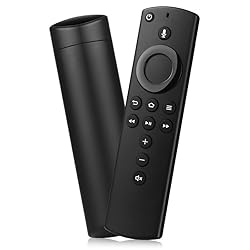
Replacement Voice Remote Control Compatible with All Fire-Series TVs Stick & Cube,TVs Stick Lite/Stick (2nd Gen)/TVs Stick 4K/TVs Cube (1st/2nd Gen),and fit for Smart TVs 3rd Gen
Style:
3rd Gen
Detalles del producto
Disponibilidad:
En stock
En stock
Peso con empaque:
0.15 kg
0.15 kg
Devolución:
Sí
Sí
Condición
Nuevo
Nuevo
Producto de:
Amazon
Amazon
Viaja desde
USA
USA
Sobre este producto
- Information: Specification: Material:Plastic Battery Type: 2 AAA batteries (Not included) Compatible with : Smart TVs Stick Lite Smart TVs Stick 2020 Release Smart TVs Stick (2nd Gen) Smart TVs Stick 4K Smart TVs Cube (2nd Gen) Smart TVs Cube (1st Gen) AMZ Smart TVs (3rd Gen) Not compatible with : Smart TVs (1st Gen) Smart TVs (2nd Gen) Smart TVs Stick (1st Gen) Smart TVs Edition smart TVs Insignia-Pioneer Smart TV Package list: 1 * User Manual 1 * Replacement Remote Control How to Pair? Press the Home button about 10-15 seconds until the LED indicator starts to rapidly flash, then waiting about 30-60 seconds (Entering Pairing mode, LED Flash), then your remote will automatically pair with your device
AR$32.532
55% OFF
AR$14.787
IMPORT EASILY
By purchasing this product you can deduct VAT with your RUT number
AR$32.532
55% OFF
AR$14.787
 Llega en 8 a 12 días hábiles
con envío
 Tienes garantía de entrega
Este producto viaja
de USA ![]() a tus manos en
a tus manos en
![]()
 a tus manos en

Conoce más detalles
Compatible with: This replacemenet remote control for Smart TVs Stick Lite, AMZ Smart TVs Stick 2020 Release, AMZ Smart TVs Stick (2nd Gen), AMZ Smart TVs Stick 4K, AMZ Smart TVs Cube (2nd Gen), AMZ Smart TVs Cube (1st Gen), and AMZ Smart TVs (3rd Gen) Please Note:This remote control replacement not compatible with Smart TVs AMZ (1st and 2nd Gen), AMZ Smart TVs Stick (1st Gen).or Smart TVs Edition smart TVs, Not for Insignia-Toshiba-Pioneer Smart TV. Please make sure your device model fit for our remote before place an order Voice Search: Our 2nd gen replacement remote control with voice function,enjoy fast convenience with built-in voice search. Ask for weather updates, play music, search for movies, and more—just use your voice How to Pair: You need to pairing this replacement voice remote control before use. Pairing is simple! Hold the Home button for 10-15 seconds until the LED light flashes rapidly, and your remote will automatically pair with your device. And the pairing interval needs to wait at least 30 seconds Notice:1: The batteries of the old remote control must be removed before pairing. 2: Please confirm your remote whether connected more than 6 limits. 3: batteries are not included
Compra protegida
Disfruta de una experiencia de compra segura y confiable
Tarjetas de Crédito y Débito

Visa

Mastercard

American Express
Pagos a través de PayPal
Compra procesada en dólares con dinero en cuenta o tarjetas internacionales.

Paypal
Pagos a través de MODO
Compra procesada en pesos desde la App de tu banco.

PayPal

